


⚠️ Read this first: if you do not have an exchange account yet, use the registration link (e.g. "Register now") or invite code BINANBT on Binance — registering directly inside the app gets you none of the new-user rewards, and the $19,800 welcome package and 20% fee rebate will not apply. This article is about on-chain wallet approvals; exchange balances are not covered by this revocation logic.
Key takeaways (TL;DR):
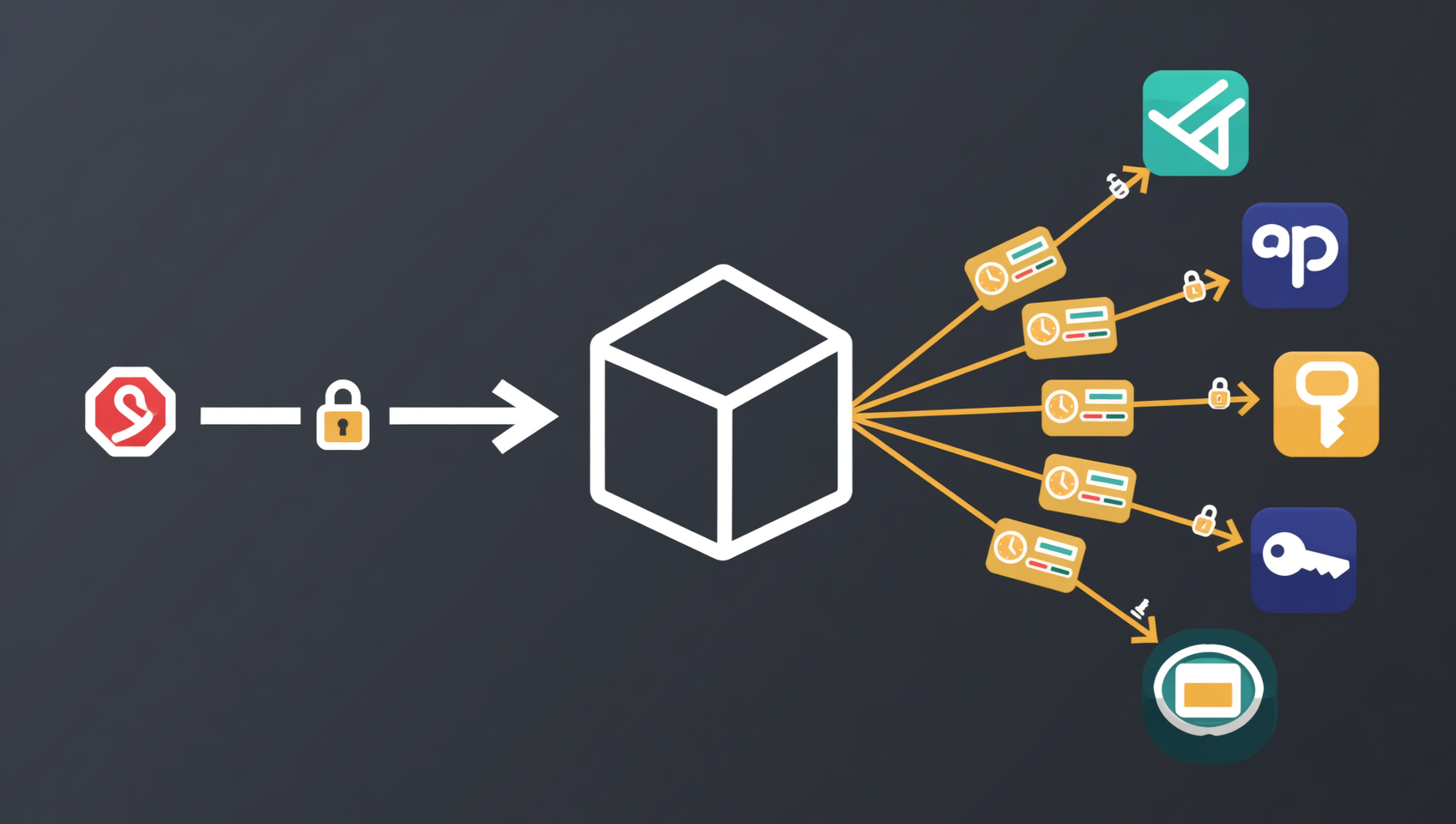
- Permit2 is not a wallet or a DApp. It is an approval middleware contract deployed by Uniswap. Tokens are approved to Permit2, and Permit2 grants allowances to individual DApps. It centralises approvals, and it centralises risk.
- There are two approval layers, and you must know which one you are revoking. Layer one is the ERC-20 allowance from your token to Permit2; layer two is the sub-allowance from Permit2 to a specific DApp. Revoking layer one shuts down every downstream spender; revoking only layer two leaves the master approval open.
- Off-chain signatures are the blind spot. A SignatureTransfer permit does not exist on-chain until it is submitted, so no revocation tool can see it. If you signed a suspicious permit, move your assets instead of clicking revoke repeatedly.
- There are two batch routes. To shut everything down, revoke the token-to-Permit2 master approval per token. To keep Permit2 for other apps, call
lockdownto clear many token/spender pairs in one transaction.- Revocation only withdraws permissions over assets still in the wallet. It cannot recover funds already taken. Leaked seed phrases, sweeper bots and unsubmitted signatures are three cases where revoking is not enough.
Most people think "revoke approval" is one click, but Permit2 makes it two layers: you may have revoked one DApp's permission while the master door to your entire balance stayed open. Permit2 was introduced by Uniswap and is now used by many DEXs, aggregators and payment flows. It lets users approve once and reuse that approval across applications — at the cost of making that one approval a single point of failure.
This guide does not repeat "click the buttons in Revoke.cash". It breaks down the permission structure: who actually holds what, which layer to revoke first, whether batching really saves gas, and when revocation cannot save you at all.
Table of contents
- What Permit2 is: approval middleware, not a wallet
- Two layers: master approval and sub-approval
- Why revoking a DApp still leaves you exposed
- Off-chain signatures: the approvals tools cannot see
- Identify which situation you are in
- Four ways to batch revoke
- Six-step Revoke.cash walkthrough
- Gas and cost: how much batching really saves
- Five cases where revoking is still not enough
- How to keep your approval surface small
- 💰 Binance fee rebate: invite code BINANBT
- FAQ
- Further reading
What Permit2 is: approval middleware, not a wallet
Permit2 is an on-chain approval contract deployed by Uniswap. Its job is to let users approve once and reuse that approval across many applications. It is not a custodial wallet, it does not trade your tokens, and it cannot withdraw your assets. It records who may move how much of which token, under what conditions.
Without Permit2, every new DApp requires a separate on-chain approve transaction for every token. Ten apps means ten approvals and ten gas payments. Permit2 turns this into two steps:
- You approve the Permit2 contract once, usually for an unlimited amount.
- Each DApp requests a sub-allowance from Permit2 by signature, without a separate on-chain approval from you.
Permit2 uses the same address on almost every chain Uniswap supports: 0x000000000022D473030F116dDEE9F6B43aC78BA3. zkSync uses a different address: 0x0000000000225e31D15943971F47aD3022F714Fa.1
It has two modules. Understanding their names makes the rest of this guide much easier:
| Module | What it stores | Typical use | How to revoke |
|---|---|---|---|
| AllowanceTransfer | On-chain allowance: token, spender, amount, expiration | Repeated swaps, subscription-like pulls | approve to zero, lockdown, invalidateNonces |
| SignatureTransfer | Single-use signature scoped to a nonce | One-off swaps, gasless approvals | Wait for expiry; advanced users can call invalidateUnorderedNonces |
The contract itself is open source and audited. The risk is not the contract; it is who holds the sub-allowance and whether you signed an off-chain message you did not understand.
Two layers: master approval and sub-approval
Before revoking anything, identify which layer you are dealing with. The two layers live in different places and have different consequences.
| Layer | Who grants it | On-chain form | Where to see it | Effect of revoking |
|---|---|---|---|---|
| Master approval | Your address → Permit2 contract | Standard ERC-20 allowance | Block explorer token approvals, Revoke.cash token list | Every Permit2-based DApp stops working until re-approved |
| Sub-approval | Permit2 → a specific spender | Allowance stored inside Permit2 | Revoke.cash Permit2 section, Permit2 allowance query |
Only that spender is affected |
| Off-chain signature | Your address → spender (not submitted) | Does not exist on-chain | Invisible to every tool | Cannot be revoked; wait for expiry or move assets |
The master approval is the main valve; sub-approvals are individual valves. If you believe the entire wallet's Permit2 exposure is untrustworthy, the most complete fix is to revoke the token-to-Permit2 master approval. With no allowance to Permit2, no downstream sub-approval can move your tokens. The cost is that every Permit2-based DApp must be re-approved the next time you use it.
If you only want to clean up one suspicious DApp while keeping the others, revoke that sub-approval and leave the master in place. Decide the goal first, then pick the layer. Do not blindly hit "revoke all".
Why revoking a DApp still leaves you exposed
Revoking a DApp's own allowance and revoking its Permit2 permission are different actions; the first does not automatically affect the second. Permit2 keeps its own allowance records on-chain. A permission a DApp obtained through Permit2 does not disappear when you set that DApp's ordinary ERC-20 allowance to zero.
Three common mistakes:
- Revoking the DApp allowance in a block explorer and assuming it is done. This clears the old token-to-DApp approval. If the DApp uses Permit2, the live path is token → Permit2 → DApp, and the master approval remains valid.
- Only checking the default list in Revoke.cash. Ordinary ERC-20 approvals and Permit2 approvals are usually displayed in separate sections. Clearing only the default list can miss Permit2 sub-allowances.
- Treating "disconnect" as revocation. Disconnecting only stops the website from seeing your address. On-chain allowances are unchanged. Revoke.cash's own FAQ states plainly that disconnecting does nothing against approval drainers.2
In one line: before revoking, confirm whose name is on the allowance. If the spender is the Permit2 contract, you are dealing with the Permit2 layer. If the spender is a DApp contract, it is an ordinary approval.
Off-chain signatures: the approvals tools cannot see
Permit2's SignatureTransfer lets you sign an off-chain message that authorises the other party to submit a transfer later. The signature costs no gas and creates no immediate on-chain record. The allowance only exists once the counterparty submits the signature to the contract.
This leads to a counterintuitive conclusion: if you just signed "approve", "permit" or "gasless transaction" on a suspicious site and no on-chain change has appeared, revocation tools cannot help, because there is nothing on-chain to revoke.
Three dangers:
- Submission can be delayed. The attacker can wait days or weeks until you relax.
- Signatures expire, but the window can be long. SignatureTransfer permits carry a deadline, and AllowanceTransfer sub-approvals carry an expiration; until then, the signature remains usable.
- Tools only see what is on-chain. An unsubmitted signature is not on-chain, so neither block explorers nor Revoke.cash can read it.
In this situation the correct order is not "revoke first":
- Move the assets in that wallet to a new wallet, high-value tokens first.
- Create the new wallet on a clean device, not on the device that may be compromised.
- Make sure the new seed phrase has never been entered on any website.
- Only then deal with the old address's approvals, and treat it as already exposed.
Revocation subtracts permissions from a wallet that still holds assets. A leaked signature is a permission already in flight; move the assets first.
Identify which situation you are in
Different situations require completely different actions. Classify first, then act. Sorted by urgency:
| Your situation | Evidence | What to do |
|---|---|---|
| You just signed on a suspicious site | Wallet showed "sign", "permit" or "gasless", with no on-chain transaction | Highest priority: move assets to a new wallet, not just revoke |
| Seed phrase or private key may be leaked | ETH sent in is swept immediately, or the device had malware | Abandon the wallet, create a new address; revoking the old one is cleanup |
| You see an unlimited allowance to an unknown spender | Revoke.cash shows unlimited allowance and an unrecognised spender | Revoke that approval; if unsure, revoke the master approval |
| An unused DApp still holds an approval | Approval older than six months and the app is unused | Revoke the sub-approval to reduce attack surface |
| Routine maintenance | No anomaly, just periodic cleanup | Check monthly; prioritise unlimited allowances and unknown contracts |
If you are unsure, assume the worst: move assets first, then revoke. Reversing the order means you may be revoking while the wallet is being drained.
Four ways to batch revoke
"Batch revoke" is not one operation. It is four methods at different layers. Choosing the wrong one either leaves exposure behind or breaks apps you still use.
| Method | How it works | What one transaction clears | Advantage | Cost |
|---|---|---|---|---|
| Revoke the master approval | Call approve(Permit2, 0) per token |
Every downstream spender for that token | Most complete; one move kills all Permit2 permissions | Every Permit2 app needs re-approval |
Permit2 lockdown |
Call lockdown(TokenSpenderPair[]) |
Many token/spender pairs at once | Keeps the master approval, clears only chosen pairs | Requires constructing a contract call; most users use a tool |
| Revoke.cash batch revoke | Select several rows in the UI and submit | Depends on how the tool bundles calls | Graphical, accessible to most users | $1.50 per batch for free users2 |
invalidateUnorderedNonces |
Pass wordPos and mask to invalidate nonces |
Multiple nonces within one bitmap word | Can invalidate unsubmitted SignatureTransfer permits | Requires knowing the nonce; most users cannot obtain it |
Two are especially misunderstood:
First, lockdown is Permit2's built-in batch revocation function. It takes an array of token/spender pairs, sets each allowance to zero in one transaction, and emits a Lockdown event.3 It suits the case "I still want to use Permit2, but I need to clear several suspicious apps at once". It does not revoke the master approval; the master stays.
Second, invalidateUnorderedNonces invalidates signatures, not allowances. SignatureTransfer uses unordered nonces: wordPos = nonce >> 8 and bitPos = nonce & 0xff, stored in a bitmap. Calling invalidateUnorderedNonces(wordPos, mask) marks those bits as used, so any later submission using those nonces fails.3 But this requires knowing which nonce the attacker intends to use. Most victims cannot obtain that information, so moving assets remains the practical answer.
Six-step Revoke.cash walkthrough
Revoke.cash does not custody assets and never asks for your seed phrase. It reads on-chain approvals and helps you generate revocation transactions. These six steps follow "look first, act second".
Step 1: Type the official URL; do not click search ads
Type revoke.cash into the address bar, check the spelling, then bookmark it. Ads at the top of search results, short links in group chats and "official revoke portal" replies on social media can all be fakes. A real revocation tool will not ask you for an unlimited approval first.
Step 2: Read-only check, then connect
If you only want to assess risk, enter the wallet address without connecting. Connect only when you are ready to revoke. The connection request lets the site read your address; it is not an approval. Any site asking for a seed phrase, private key, keystore or wallet password is fake.
Step 3: Select the correct chain
Approvals are recorded per chain. An Ethereum approval does not cover BSC, Polygon, Base or Arbitrum. Check every chain where you have used DApps. Checking only mainnet checks only part of your wallet.
Step 4: Separate ordinary approvals from Permit2 approvals
Find the Permit2 section, or rows where the spender is the Permit2 contract address. For each one, confirm the token, the spender, whether the amount is specific or unlimited, and whether it has an expiration. Handle unlimited allowances, unknown spenders and long-unused approvals first.
Step 5: Choose the layer that matches your goal
- Shut everything down: revoke the token-to-Permit2 master approval, one transaction per token.
- Clear a few apps only: revoke the corresponding Permit2 sub-approvals, or use the tool's batch entry.
- Just signed a suspicious off-chain permit: stop here, move assets first, revoke later.
Step 6: Verify and clean up
Refresh the list and confirm the approval is gone or the allowance is zero; then confirm the transaction succeeded in a block explorer. If it failed, common causes are insufficient gas, congestion, or restrictions in the token contract.
If assets are being drained while you revoke, stop clicking and move what remains to a safe address first. Reversing the order means you may be revoking while the wallet is being swept.
Gas and cost: how much batching really saves
Batching saves transaction count and time, not necessarily gas per call — but in this scenario, transaction count is the main cost. A concrete example:
Suppose your wallet has 3 tokens and has granted 4 DApps Permit2 sub-approvals on each, for 12 sub-approvals total.
| Approach | Transactions | Result |
|---|---|---|
| Revoke 12 sub-approvals one by one | 12 | Slowest and most expensive; gas per call |
| Revoke the 3 master approvals | 3 | Kills all 12 downstream at once, but every Permit2 app stops working |
lockdown 12 token/spender pairs |
1 | Keeps the master approval, clears only those 12 |
| Revoke.cash batch revoke | 1 submission (may bundle several calls) | Graphical; $1.50 per batch for free users |
The conclusion is direct: if the goal is "shut down all Permit2 permissions on this wallet", revoking the master approval per token is usually cheapest — 3 transactions instead of 12. Only if you still need Permit2 for other applications do you need lockdown or the tool's batch feature.
Gas varies with congestion: an Ethereum mainnet revocation can cost a few dollars to a dozen, while an L2 revocation usually costs cents. When revocation costs more than the wallet holds, switching wallets is the better trade — move the remaining assets to a new address and abandon the old one.
Five cases where revoking is still not enough
Revocation only handles allowances that already exist on-chain. It does not solve the following five problems. Check them so you do not treat revocation as a cure-all.
- An unsubmitted Permit signature. It is not on-chain, so no tool can see or revoke it. It must expire or you must move assets.
- A leaked seed phrase or private key. The attacker can import the wallet and take everything without any approval. A sweeper bot that takes ETH the moment it arrives means the seed phrase is already compromised; revocation is meaningless.
- A compromised device, even with a safe seed phrase. Malware can replace copied addresses and alter the transaction you see, including the revocation transaction itself.
- Other permission types. NFT
setApprovalForAll, ERC-20 allowances to other contracts, and EIP-7702 delegations may sit outside the Permit2 list and need separate checks. - Assets already taken. Revocation prevents future pulls, not past losses. On-chain transactions are irreversible, and no "paid recovery" service can undo them.
A practical rule: after revoking, if the wallet still holds assets and you are unsure whether a signature leaked, the safest move is to transfer those assets to a new wallet rather than keep operating the old address.
How to keep your approval surface small
Approval security is less about emergency revocation and more about not granting excessive permissions in the first place. Five habits reduce exposure materially:
- Use separate wallets. Keep long-term holdings in a cold wallet or a receive-only main wallet; use a separate hot wallet with small balances for interactions, mints and airdrop claims.
- Set specific amounts. When an approval form allows a number instead of unlimited, use it. It is one extra step, but it caps the loss.
- Prefer approvals with an expiry. Permit2's AllowanceTransfer supports expiration, and some apps set one. Time-bound approvals are safer than permanent ones.
- Check monthly. Bookmark Revoke.cash and review unlimited allowances and unknown spenders every month, not after a loss.
- A hardware wallet does not prevent approval drainers. It protects the private key, but approval theft does not need the key. If you sign a malicious approval, the hardware wallet confirms the very transaction you signed.2
💰 Binance fee rebate: invite code BINANBT
On-chain approvals are your responsibility; exchange fees can be reduced long-term: register with invite code BINANBT for a 20% trading-fee rebate. This article contains referral links; we may earn a reward if you register through them, at no extra cost to you.
- Rebate: 20% of trading fees, ongoing.
- Welcome package: up to $19,800, unlocked through tasks — not cash on sign-up.
- How to claim: enter BINANBT in the invite-code field during registration. That is the most reliable method.
- Important: registering directly inside the app gets you none of the new-user rewards. In-app registration attaches no referral relationship, so the $19,800 welcome package and the 20% rebate will not apply. Use the registration link or enter BINANBT.
👉 Register on Binance and claim the 20% fee rebate
FAQ
Is Permit2 a scam?
No. Permit2 is an open-source, audited approval contract from Uniswap and is used by many legitimate DApps. The risk is not the contract; it is granting sub-allowances to malicious apps or signing off-chain messages you do not understand.
Does revoking a DApp also revoke Permit2?
No. Ordinary ERC-20 approvals and Permit2's internal allowances are separate records. To revoke Permit2 access, revoke the token-to-Permit2 master approval or the specific Permit2 sub-approval.
What is the Permit2 contract address?
On almost every chain Uniswap supports: 0x000000000022D473030F116dDEE9F6B43aC78BA3. On zkSync: 0x0000000000225e31D15943971F47aD3022F714Fa. Verify the address in your wallet or block explorer rather than trusting a name shown on a page.
How much gas does revoking Permit2 cost?
It depends on the chain and congestion. Ethereum mainnet can cost a few dollars to a dozen; L2s usually cost cents. Batching reduces transaction count, but each transaction still has base overhead. Trust the estimate shown before you sign.
Is batch revoking always cheaper than revoking one by one?
Not always, but it usually means fewer transactions and a lower total. More importantly, choose the right layer: revoking the master approval can kill 12 downstream approvals in 3 transactions, cheaper than 12 individual revocations.
I signed a suspicious Permit signature. Does revoking help?
Only marginally. An unsubmitted signature is not on-chain, so tools cannot see it, and the attacker may still submit it before expiry. Move assets to a new wallet first, then handle the old address's approvals.
Does Revoke.cash charge a fee?
Viewing approvals and revoking one by one is free apart from network gas. Batch revoke costs $1.50 per batch for free users, while Premium includes unlimited batch revoking. Check the site for current pricing.
Can a hardware wallet prevent Permit2 drainers?
Not fully. A hardware wallet protects the private key, but approval theft does not require the key. If you sign a malicious approval, the hardware wallet is confirming the transaction you chose to sign. It reduces key-leak risk but does not replace approval hygiene.
Further reading
- How to revoke wallet approvals with Revoke.cash
- MetaMask stolen funds: a 30-minute recovery checklist
- Missing tokens in your wallet: eight causes
- MetaMask wallet guide 2026
- Cold wallets and hardware wallets explained
- More wallet and security guides
Disclaimer: this article is for educational purposes only and is not investment advice. On-chain approvals and revocations are irreversible; gas costs and contract behaviour depend on the live network and your wallet's prompts. Contract addresses and functions are taken from Uniswap's official documentation and open-source code, and tool interfaces or pricing may change. Verify domains, contract addresses and transaction details yourself, and confirm that your actions are lawful in your jurisdiction.
Footnotes
-
Source: Uniswap Permit2 documentation: Permit2 is deployed at
0x000000000022D473030F116dDEE9F6B43aC78BA3on almost every chain Uniswap supports, and at0x0000000000225e31D15943971F47aD3022F714Faon zkSync; checked 2026-11-05. ↩ -
Source: Revoke.cash FAQ: disconnecting a wallet is not revocation; the core tool is free, batch revoke costs $1.50 per batch for free users; hardware wallets do not protect against approval exploits; checked 2026-11-05. ↩ ↩2 ↩3
-
Source: Uniswap Permit2 source code:
AllowanceTransfer.lockdown(TokenSpenderPair[])zeroes multiple token/spender allowances in one transaction;SignatureTransfer.invalidateUnorderedNonces(wordPos, mask)invalidates unordered nonces via a bitmap, withwordPos = nonce >> 8andbitPos = nonce & 0xff; checked 2026-11-05. ↩ ↩2