


Table of Contents
- TL;DR: the one-sentence answer
- Three terms to untangle first: network, token standard, gas
- ERC20, BEP20, or TRC20: one table
- Rule one: ask what the receiving side supports before comparing fees
- Withdrawing USDT from Binance to MetaMask in 6 steps (BEP20 example)
- Sent on the wrong network? Three scenarios, two are fixable
- Decision table: which network fits your case
- The 5 mistakes beginners make most
- FAQ
- Bottom line
TL;DR: the one-sentence answer
Choose the network by what the receiving side supports first; only then compare fees and speed. Sending to a self-custody wallet like MetaMask? Any chain works, and BNB Smart Chain (BEP20) is the sensible default — withdrawal fees usually under 1 USDT, arrival in minutes. Ethereum (ERC20) is the most "expensive" but the most universal: typically a few dollars, higher when the network is congested1. And the fear that a wrong network means lost funds is usually a false alarm: ERC20 and BEP20 both use 0x Ethereum-style addresses, and the same seed phrase produces the same address on every EVM chain — switch networks and the mistyped funds show up. Only two situations are genuinely hard to fix: sending to an exchange that doesn't support the network you used, or sending to an incompatible address like a T-address. One more cleanup: BEP2, which still haunts older tutorials, was switched off on November 19, 20242 — ignore it if you ever see it.
Three terms to untangle first: network, token standard, gas
The withdrawal page asks you to pick a "network" — that decides which road your funds travel, not what cargo changes. Once these three terms are separated, the rest of the logic falls into place:
- Network (chain): which blockchain actually records your balance. Ethereum is one road; BNB Smart Chain is another.
- Token standard (ERC20 / BEP20): the "cargo spec" on each road. ERC20 is Ethereum's token standard; BEP20 is BNB Smart Chain's. That's why the network list shows combined names like "Ethereum (ERC20)" and "BNB Smart Chain (BEP20)".
- Gas: the fee the chain charges to record a transfer, paid in the chain's native coin — ETH on Ethereum, BNB on BSC. Binance's withdrawal fee covers that on-chain cost plus a service margin.
The single most useful idea here: USDT-ERC20 and USDT-BEP20 are two different tokens, not one token living on two chains. Both are worth $1, but they can't be sent to each other directly — turning one into the other means going through exchange deposits/withdrawals again, or a cross-chain tool. Whichever chain the receiver supports is the only chain your funds can arrive on.
ERC20, BEP20, or TRC20: one table
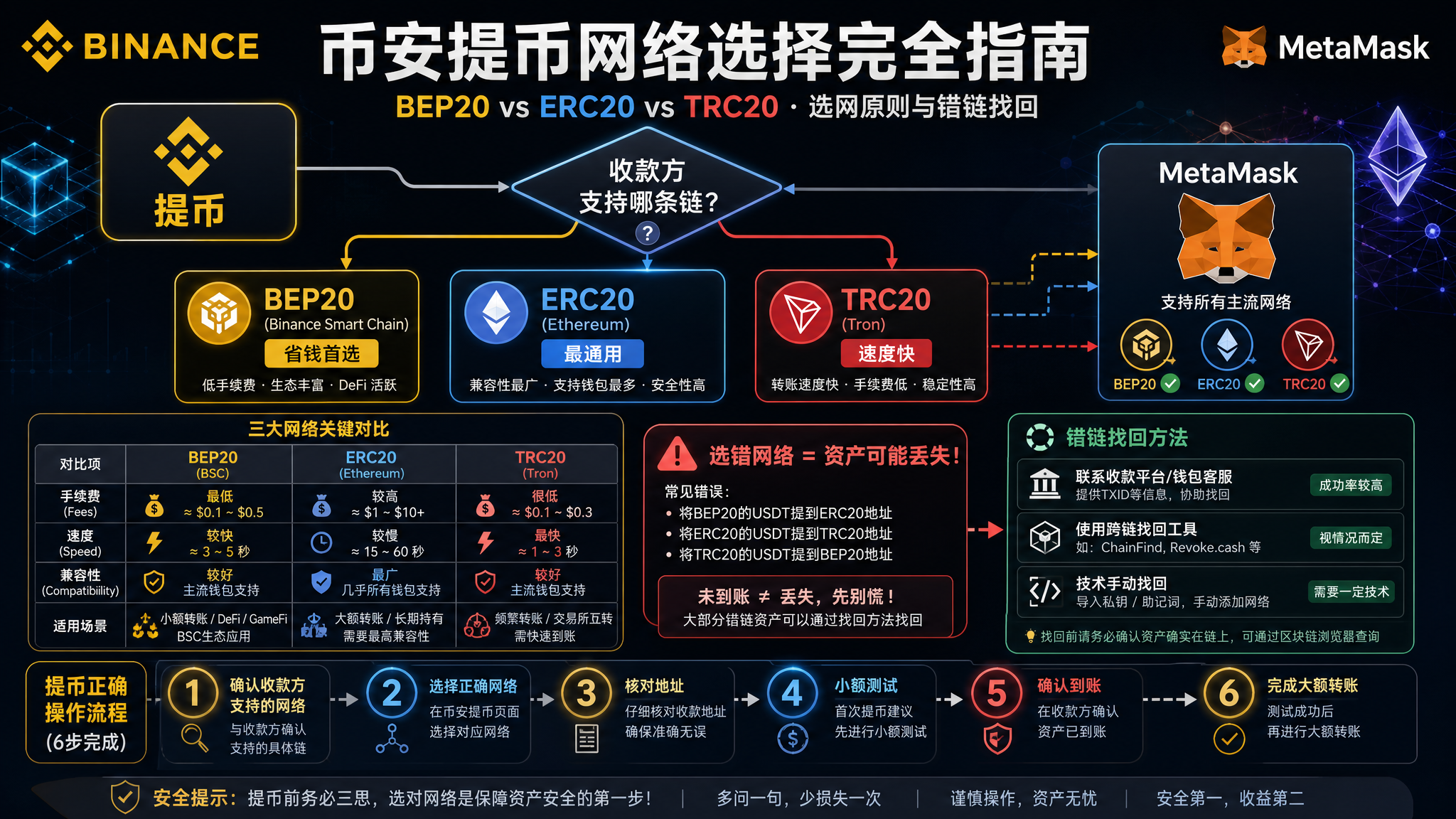
For most Binance withdrawals, the real choice is BEP20 vs ERC20; TRC20 is the third common option but uses a different address system. Fees below are order-of-magnitude references verified in August 2026 — the withdrawal page is the source of truth13:
| Comparison | Ethereum (ERC20) | BNB Smart Chain (BEP20) | TRON (TRC20) |
|---|---|---|---|
| Blockchain | Ethereum | BNB Smart Chain (BSC) | TRON |
| Address format | starts with 0x | starts with 0x | starts with T |
| Wallet gas coin | ETH | BNB | TRX |
| Typical withdrawal fee | a few dollars, more when congested | usually under 1 USDT | shown per page, usually low |
| Typical arrival time | minutes to tens of minutes | minutes | minutes |
| MetaMask support | built-in | one click from the built-in network list4 | needs a dedicated TRON wallet |
| Best for | platforms that only accept ERC20, mainnet DeFi | MetaMask / BSC ecosystem, everyday self-custody | platforms that only accept TRC20 |
Two cautions:
- Treat the fees as magnitudes, not quotes. Withdrawal fees adjust in real time with congestion, and the confirmation screen lists each network's fee and estimated arrival side by side — read it before you confirm1.
- You won't find BEP2 on the list anymore. BEP2 belonged to the old BNB Beacon Chain, which was sunset on November 19, 2024; Binance stopped BEP2 deposits and withdrawals along with it2. If an old tutorial recommends "BEP2, it's cheaper," skip the tutorial.
Rule one: ask what the receiving side supports before comparing fees
Almost every "wrong network" horror story skipped this step: the receiver didn't support the chosen chain. Get the decision order right and everything else is easy:
Scenario one: withdrawing to a self-custody wallet like MetaMask or Rabby — pick any chain. A self-custody address is generated by your own seed phrase and exists on every Ethereum-style chain (a 0x address is valid on all of them). Fee and speed become the only criteria, and BEP20 is the default for beginners.
Scenario two: withdrawing to another exchange's deposit address — use exactly a network the receiver lists. Exchanges generate deposit addresses per network, and their deposit page shows which networks they support. Anything not on the list may require manual recovery, fees, or be gone. Binance says it outright: tokens deposited through an incorrect network may not be retrievable5. The same logic applies in both directions.
Scenario three: you only got an address, no network — ask before sending. This is where real-world accidents happen: a P2P counterparty drops a 0x address in chat with no chain specified. One question — "which network's USDT do you receive?" — saves a hundred times the trouble of a support ticket. If they can't answer clearly, keep the trade on-platform like the Binance C2C flow instead of transferring off-platform.
Withdrawing USDT from Binance to MetaMask in 6 steps (BEP20 example)
📺 Want to follow along step by step? Watch the Binance crypto withdrawal video tutorial.
The whole flow boils down to two moves: confirm the network and address on the wallet side first, then pick the matching network on the exchange side. Steps below use the Binance app (web is similar):
- Add BNB Smart Chain to MetaMask. In current versions, BNB Smart Chain is in the built-in "Add network" list — just select it. If it's missing, enter the official parameters manually: chain ID 56, currency symbol BNB; RPC and explorer URLs are in BNB Chain's official docs4. For setup and security hardening, see the MetaMask wallet guide.
- Copy your 0x receiving address. Tap the address bar in MetaMask to copy. Note: the same 0x address exists on both Ethereum and BSC, so you don't need to switch networks before copying — the selected network affects display, not reception.
- Open Binance and go to withdrawals. App path: [Wallet] → [Withdraw] → [On-Chain Withdrawal], then select USDT1.
- Paste the address and pick "BNB Smart Chain (BEP20)". Binance validates the address format against the chosen network. This is the most important screen in this whole article: every network option shows its fee and estimated arrival time — read them before selecting.
- Check three items, then confirm. Fee, minimum withdrawal amount, receiving network. The confirmation screen even reminds you to make sure the receiving platform supports that network — this article's rule one, in Binance's own words.
- Send a small test first, then the rest. For a first withdrawal, send 10–20 USDT, switch MetaMask to BNB Smart Chain, confirm the balance, then move the remainder.
One more beginner-critical note: after a BEP20 withdrawal, the wallet needs a small BNB balance to send anything later (gas). Withdraw the equivalent of 5–10 USDT in BNB while you're at it — otherwise you'll hit the awkward state of "holding USDT that can't move."
No Binance account yet? Register on Binance (referral code: BINANBT) — for onboarding basics, see the Binance registration & deposit guide. OKX (referral code: 60895497) works the same way when it comes to choosing withdrawal networks.
Sent on the wrong network? Three scenarios, two are fixable
Don't panic. Sort by where the funds landed — two of the three scenarios are recoverable, the third basically isn't.
Scenario A: sent to your own 0x address but on the wrong chain (BEP20 ↔ ERC20 mix-up). Fixable by yourself, and it's the most common and luckiest case. Because the same seed phrase produces the same 0x address on Ethereum and BSC, your funds are simply "recorded on the other chain's ledger." Fix: open MetaMask, switch to the network the funds actually live on (ERC20 mix-up → switch to Ethereum; BEP20 mix-up → switch to BNB Smart Chain), and the balance is right there. No tools, no support tickets.
Scenario B: sent to another platform/exchange that doesn't support the network. Recoverable, but on their terms, possibly for a fee. The keys are in the receiver's hands: contact their support with the TxID (transaction hash) and request a manual credit or refund; many exchanges have a self-service "deposit not arrived" tool. Two caveats: many platforms charge tens of dollars and take weeks; and recovery is their policy, not a promise — Binance's own guidance is that tokens deposited via the wrong network may not be retrievable5. One common misconception worth killing: Binance's self-service recovery tool is for funds coming into Binance; coins you withdrew from Binance to somewhere else are outside its help.
Scenario C: sent to an incompatible address (say, a 0x-coin withdrawal to a T-address). Essentially unrecoverable. On a different address system, the destination account doesn't exist — the transfer can show "successful" on-chain while the assets sit in a black-hole address nobody controls. This is why the ten-second address-format check (0x for ERC20/BEP20, T for TRC20) before every withdrawal is worth it.
If funds are "missing" but you can't tell which scenario applies, run the three-step triage in wallet tokens not showing first, then act.
Decision table: which network fits your case
Line up the receiver's supported networks first, then find your row:
| Your situation | Pick | Why |
|---|---|---|
| To MetaMask, everyday self-custody | BEP20 | Lowest fee, fast arrival; keep BNB for gas |
| To MetaMask, planning mainnet DeFi next | ERC20 | Funds arrive on Ethereum mainnet, skip a bridge; accept the higher fee |
| Receiver's deposit page lists only ERC20 | ERC20 | No choice if they don't support it — don't gamble |
| Receiver's deposit page lists only TRC20 | TRC20 | Use a TRON-compatible wallet address (T-address), never your 0x address |
| You only got a 0x address, no network named | Ask first | One question beats a support ticket; unclear answer → don't send |
| You got a T-address | TRC20 | Address format is the first checkpoint; 0x → T means certain loss |
| Heading to BSC for DeFi/GameFi | BEP20 | On-chain gas of a few cents suits small, frequent operations |
One sentence: the receiver picks the chain; you only pick the route within it — free choice for self-custody, strict adherence across platforms.
The 5 mistakes beginners make most
- Treating "network" as a currency conversion. Withdrawing on BEP20 or ERC20 both deliver the same USDT, to the last cent; what changes is which chain holds it and what you pay. Hoping to "save coins by switching networks," or fearing deductions from switching, both miss the point — only the fee changes.
- Sending a 0x address to someone who expects TRC20. Address format is the fastest checkpoint: 0x addresses are Ethereum-family only (ERC20/BEP20), T-addresses are TRON. Mismatched formats plus persistence equals scenario C.
- Forgetting gas. You withdraw on BEP20, then want to move funds — and the wallet has no BNB, so nothing moves. Carry a little BNB along with the withdrawal and the problem never exists.
- Big transfers without a test send. First withdrawal, first network, first new address — any "first" deserves a small dry run. That's not timidity; it's compressing the failure cost from "the whole amount" to "10 USDT."
- Following old tutorials into BEP2. BEP2 shut down with its chain in November 20242; tutorials still recommending it are expired. The BNB-family network today is BNB Smart Chain (BEP20).
FAQ
Which network should I choose when withdrawing from Binance to MetaMask?
First check which coin you're moving and where it's going; then compare fees. A self-custody wallet like MetaMask can receive on Ethereum (ERC20), BNB Smart Chain (BEP20), or TRON (TRC20) — but the address formats differ: 0x addresses work for ERC20 and BEP20, while T-addresses are for TRC20. If cost and speed are all that matter, BEP20 usually has the lowest fee and the fastest arrival.
What is the difference between BEP20 and ERC20?
BEP20 is the token standard on BNB Smart Chain; ERC20 is the token standard on Ethereum. The same USDT exists as two different tokens on the two chains — both worth $1, but not directly interchangeable across chains. The practical difference is cost and speed: BEP20 withdrawals usually cost under 1 USDT in fees, while ERC20 follows Ethereum gas — typically a few dollars, more during congestion.
If I withdraw on the wrong network, is my money gone?
Usually recoverable, with exceptions. ERC20 and BEP20 both use Ethereum-style 0x addresses, and the same seed phrase produces the same address on every EVM chain — switch networks in your wallet and the mistyped funds appear. But if you sent to an exchange that doesn't support that network, recovery depends on their support team and may cost a fee; funds sent to incompatible addresses (like T-addresses) are effectively unrecoverable.
How much does Binance charge for withdrawals?
Withdrawal fees are shown per network and should be read off the live withdrawal page. As of August 2026, USDT via BEP20 typically carries a fixed fee under 1 USDT, while ERC20 typically costs several dollars and rises with network congestion. Binance collects this to cover on-chain costs — it has nothing to do with your wallet balance.
Do I need BNB in MetaMask after a BEP20 withdrawal?
Yes — after withdrawing on BEP20, you need a small amount of BNB in the wallet to send anything later. Gas on BSC is cheap (usually cents), but with zero BNB your funds are stuck. A common habit is to also withdraw the equivalent of 5–10 USDT in BNB as fuel.
Should I send a small test withdrawal first?
For any first — first withdrawal, first network, first new address — send 10–20 USDT first. Confirm the address, network, and arrival end-to-end before moving the rest. A test costs minutes and a small fee; skipping it can cost you the whole transfer.
Bottom line
Pick the network by what the receiver supports, not by what's cheapest; self-custody means free choice (BEP20 by default), cross-platform means strict adherence. The 0x address works across EVM chains, so most wrong-network sends can be fixed by switching networks — but a format check and a small test transfer will always be cheaper than recovery.
Fill in the prerequisites in order: the deposit & withdrawal tutorial explains on-chain transfers end to end, the Binance first deposit guide gets your first funds ready, and this article completes your first withdrawal. Once funds are on BSC, continue with the BSC ecosystem guide; before moving money anywhere, read the seed phrase & private key guide.
Recommended exchanges: Binance (referral code: BINANBT) | OKX (referral code: 60895497) — both support multi-network withdrawals with the same page logic.
📚 Further reading: On-Chain Guide — a free tutorial site for learning blockchains and on-chain data from zero.
Disclaimer: This article is for educational purposes only and does not constitute investment advice. Crypto transfers are irreversible once sent — always verify the address and network before withdrawing. Make decisions based on your own circumstances.
Footnotes
-
Binance, "How to Withdraw from Binance" (https://www.binance.com/en/support/faq/detail/115003670492): app path [Wallet] → [Withdraw] → [On-Chain Withdrawal]; the withdrawal page lists fee, estimated arrival time, and minimum withdrawal per network; the confirmation screen reminds you to ensure the receiving platform supports the selected network. Verified 2026-08-29. ↩ ↩2 ↩3 ↩4
-
Binance announcement (https://www.binance.com/en/square/post/15510533786689): BNB Beacon Chain (BEP2) sunset completed 2024-11-19 06:00 (UTC); Binance stopped BEP2 deposits and withdrawals accordingly. Verified 2026-08-29. ↩ ↩2 ↩3
-
Fee magnitudes: BscScan Gas Tracker (https://bscscan.com/gastracker) shows BSC gas prices at very low levels; a third-party stablecoin transfer cost comparison (https://www.spark.money/tools/stablecoin-fee-calculator) shows ERC20 transfer costs rising sharply with congestion. Figures here are magnitude descriptions; the live withdrawal page is authoritative. Verified 2026-08-29. ↩
-
BNB Chain official docs, "Wallet Configuration" (https://docs.bnbchain.org/bnb-smart-chain/developers/wallet-configuration/): BNB Smart Chain mainnet chain ID 56, currency symbol BNB, with official MetaMask network parameters. Verified 2026-08-29. ↩ ↩2
-
Binance Academy, "How to Recover Crypto Transferred to the Wrong Network on Binance" (https://www.binance.com/en/academy/articles/how-to-recover-crypto-transferred-to-the-wrong-network-on-binance) and Binance, "Retrieve a Deposit That Hasn't Arrived with Self-Service Recovery" (https://www.binance.com/en/support/faq/detail/4d1347b4d6d44564ba44ea785703a4fd): tokens deposited via the wrong network may not be retrievable; the self-service tool covers transfers into Binance, requires the TxID, and recovery may carry a fee. Verified 2026-08-29. ↩ ↩2