
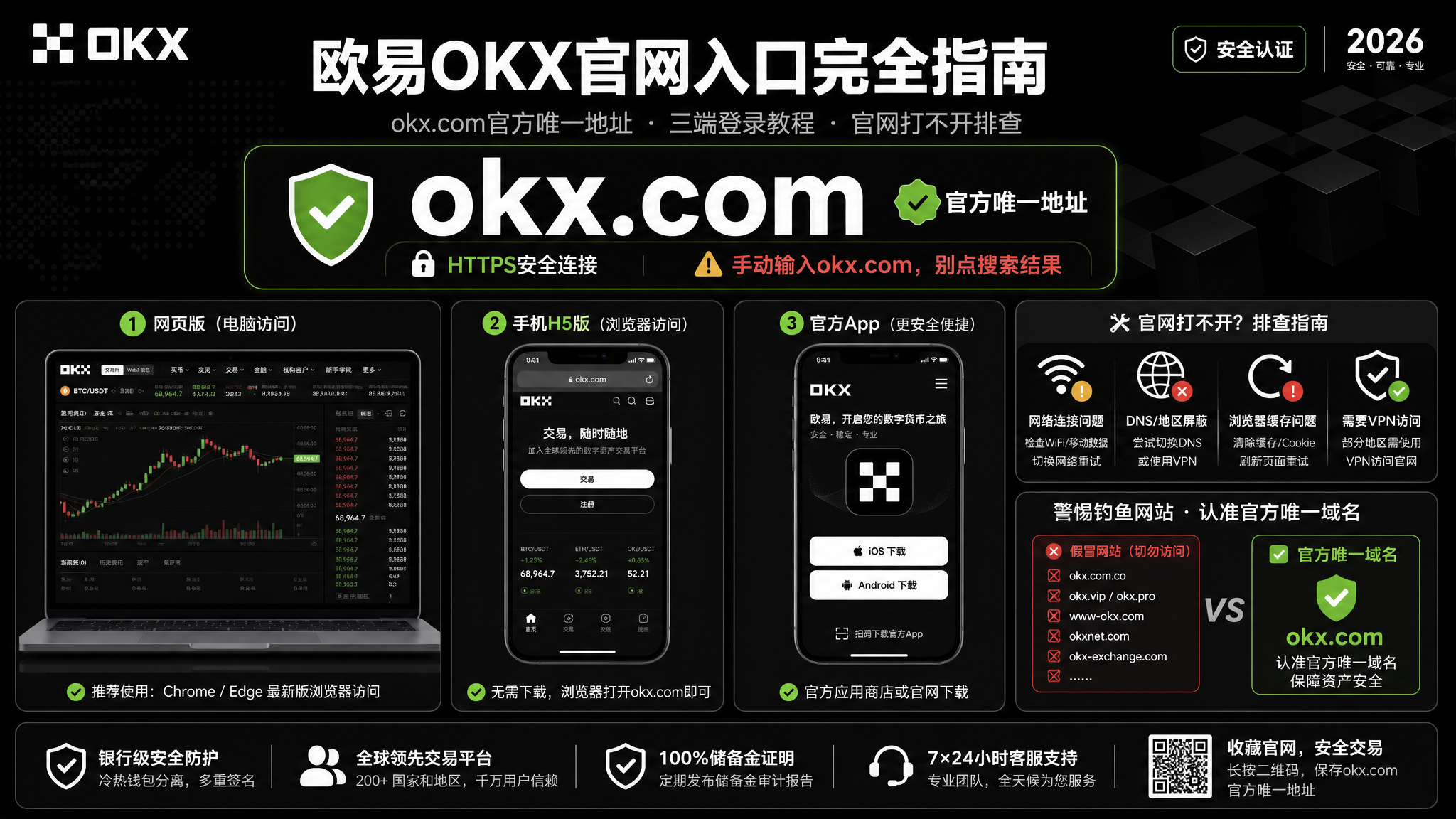
OKX Official Website 2026: The One okx.com Entry, Web/Desktop Login & Site-Unreachable Fixes
The OKX official website has exactly one entry in 2026: okx.com. How to use it on three devices — desktop web version, mobile H5, and the official-download app — plus step-by-step fixes for a site that won't open or a login that won't go through, and how to verify the official domain against fakes. One rule: type okx.com manually, never click search-result links.
Table of Contents
- TL;DR: the one-sentence summary
- There is only one OKX official site: okx.com
- Three devices: desktop web / mobile H5 / mobile app
- When to use the web version vs the app
- Site won't open or can't log in? The troubleshooting table
- Verify it's official: three anti-fake anchors
- FAQ
- Further reading
TL;DR: the one-sentence summary
The bottom line: OKX has exactly one official website — type okx.com manually and open it; never click any other "OKX official site" or "OKX official entry" link. Three devices in one sentence: use the web version on desktop (open okx.com in a browser and log in to trade), prefer the app on mobile (from the download page www.okx.com/download or an app store), and the mobile browser's H5 web version is a fallback. Many people "can't log in" because they've typed their credentials into a counterfeit site — so this article starts with how to verify the official domain, then the login troubleshooting order. The web version and app are the same account with synced data — there's no such thing as a "stripped-down web version"12.
There is only one OKX official site: okx.com
The answer first — there is exactly one official domain:
OKX official website: okx.com (download page: www.okx.com/download)
Stick to one rule: the last segment of the URL must be okx.com. The "OKX official site" and "OKX official entry" ads you see at the top of search results are often paid counterfeit sites — copied to look exactly like the real thing, the only difference being the URL isn't okx.com. Log in there and your credentials are gone1.
This deserves its own section because the "OKX official site" links ranked high in search engines are often not the real site. The safest habit is always to type okx.com manually, or open it from browser bookmarks, rather than clicking search results.
Three devices: desktop web / mobile H5 / mobile app
OKX's "official website" is the same okx.com entry point, but it lands differently per device:
| Your device | Which route | Notes |
|---|---|---|
| Desktop (Windows / Mac) | Open okx.com in a browser and log in | This is the "web version" / "desktop version" — no install needed |
| Mobile · want to trade directly | Install the official app | Smoothest, with push notifications; from the download page or an app store |
| Mobile · don't want the app | Open okx.com in the phone browser | H5 web version — fewer features but works for a quick login |
Desktop web version, two steps:
- Type okx.com in the browser address bar (or open from bookmarks)
- Click "Log in" in the top-right, enter credentials / QR / verification code, and you're on the full trading interface
The desktop web version's biggest convenience: nothing to download or install — open the browser and you're in, ideal for watching charts, placing orders, and monitoring K-lines on a computer.
Downloading the mobile app is "download & install" territory — not repeated here. For the full route see the OKX download & install guide (detailed Android/iOS steps) and the OKX app download quick guide (just the fastest way). Here just remember the entry: get the app from the official download page www.okx.com/download too, never a third-party site1.
When to use the web version vs the app
You don't have to pick one — split by scenario:
| Scenario | Use | Why |
|---|---|---|
| Watching charts / placing orders on a computer | Web version | Big screen, no download, fast switching |
| Trading on the go, push notifications | App | Smooth, notifications, biometric login |
| On someone else's computer / don't want the app | Web version | Open the browser, log out when done |
| No app installed but need a quick check | H5 web version | Fallback, fewer features |
One key correction: the web version and app are the same account with the same core features (spot, futures, earn are all there), and data is fully synced. There's no "stripped-down web version" or "must use the app to trade" rule. The only difference is interaction and updates — the app needs download/update, the web version is always current.
Site won't open or can't log in? The troubleshooting table
"Can't log in" is a common OKX-related search, but a reality check first: most of the time it's not a platform outage — you're either not on the real site, or a network/verification step is stuck. Work through the table in order instead of retrying the same action:
| Symptom | Most likely cause | What to do |
|---|---|---|
| The "official site" looks odd, asks for lots of info | You're on a counterfeit site | Close it and type okx.com manually |
| Site won't open / keeps spinning | Regional policy or network fluctuation | Try another browser (Chrome/Edge), a different time; comply with local laws |
| SMS verification code not arriving | Carrier blocking / SMS delay | Check SMS spam, wait and resend, don't spam the button |
| Email verification code not arriving | It went to spam | Check email spam, whitelist the official sender |
| Forgot password | Forgotten password | Click "Forgot password" on the login page, follow the recovery flow |
| Google Authenticator (2FA) rejected | Phone time out of sync / authenticator lost | Sync the phone time first; if lost, re-bind via official identity verification |
| Can't log in inside the app | Usually network/region | Try the web version okx.com first to isolate app vs network |
The general order: first confirm the URL is okx.com (rule out a fake site) → then network and region → then verification codes and password → last, account security (2FA). Reversing the order wastes time — or worse, hands your password to a fake site.
Verify it's official: three anti-fake anchors
Check these three anchors before and after logging in — all must hold:
- Domain: the URL's last segment must be okx.com (the official download page is www.okx.com/download). Any other domain, even an identical-looking page, is counterfeit1
- Address bar: on a desktop browser, the padlock icon (HTTPS) is the baseline — but it only prevents plaintext transmission, not counterfeit sites, so anchor #1 is what matters
- App developer: when downloading on mobile, verify the App Store developer is OKX Inc. (OKX officially states all other developers are counterfeit)2
⚠️ The "OKX official site" and "OKX official entry" links ranked high in search engines are often paid counterfeit sites. The safest practice is to type okx.com manually or open it from bookmarks — never click search-result download or login links.
Once verified, move to the account stage:
- New user: complete registration and KYC with the OKX registration guide. You can use CoinVado's referral code 60895497 at registration (disclosure below)
- Existing user: after logging in, enable face/fingerprint and Google Authenticator (2FA) — more important than any other setting
Transparency note: The registration links here are CoinVado referral links. Registering through them doesn't cost you anything extra; we may receive a platform rebate that helps keep the site running.
💰 No OKX account yet? Register OKX (referral code: 60895497), and once registered and verified, see the OKX spot & futures trading guide.
FAQ
Q1: What is the actual official OKX website URL? Only okx.com (download page www.okx.com/download). Make sure the last segment is okx.com — any other domain is counterfeit; type it manually, don't click search results.
Q2: What if the OKX website won't open? It depends on regional policy — comply with local laws. If the network is fine but loading is slow, switch browsers or times. Don't click third-party "official entry" links because the site won't open.
Q3: What's the difference between the web version and the app? Both have core trading features, same account, synced data. Use the web version on desktop and the app on mobile; there's no "stripped-down web version."
Q4: What if I can't log in? First confirm you typed okx.com manually (rule out a fake site), then check network/region, verification codes, password, and 2FA in order — see the troubleshooting table.
Q5: How do I confirm it's the genuine website? Three anchors: the domain ends in okx.com, the address bar shows a padlock (HTTPS), and the app developer is OKX Inc.
(The above is a summary; full answers are in the structured FAQ data at the top of the page.)
Further reading
- OKX download & install guide: Android APK, iOS official download & anti-fake install — full steps to download the app from the official site
- OKX app download 2026: official entry, Android APK & iOS in three steps — just the fastest way to install
- OKX registration guide: sign-up, KYC & deposit — register after entering the official site
- OKX 2026 full review: fees, features & security — decide if OKX is right for you
- Binance vs OKX comparison: which to choose — how the two top exchanges compare
Data verification note: The official domain (okx.com), download page (www.okx.com/download), and App Store developer name (OKX Inc.) were verified on 2026-09-12 against the OKX official download page and the OKX official anti-fake help page. Domain and developer names may change over time — go by what the official site and store pages show when you open them.
Disclaimer: This content is for educational purposes only and does not constitute investment, legal, or tax advice. Crypto trading is restricted or regulated in some regions; understand and comply with your local laws. Virtual asset prices are highly volatile and you may lose your principal. Decide carefully.
Footnotes
-
OKX official download page (https://www.okx.com/download): official domain okx.com, official app download entry, web and app download methods. Verified 2026-09-12. ↩ ↩2 ↩3 ↩4
-
OKX official anti-fake help page "認準正版,謹防假冒App詐騙" (https://www.okx.com/help/avoid-being-scammed-by-fake-software): App Store official developer name is OKX Inc., download from the official site or official app stores, all other developers are counterfeit. Verified 2026-09-10. ↩ ↩2